15 Social Media Tactics to Promote Your Upcoming Theatrical Show

We just finished the 10-day festival of independent theatre and weirdness known as the Indianapolis Fringe Theatre Festival, and I had a chance to see a few shows, including a couple of old favorites.

I also had a chance to talk social media — because I’m an annoying geek that way — with a couple performers, and decided to write a blog post based on what I told a couple of them.

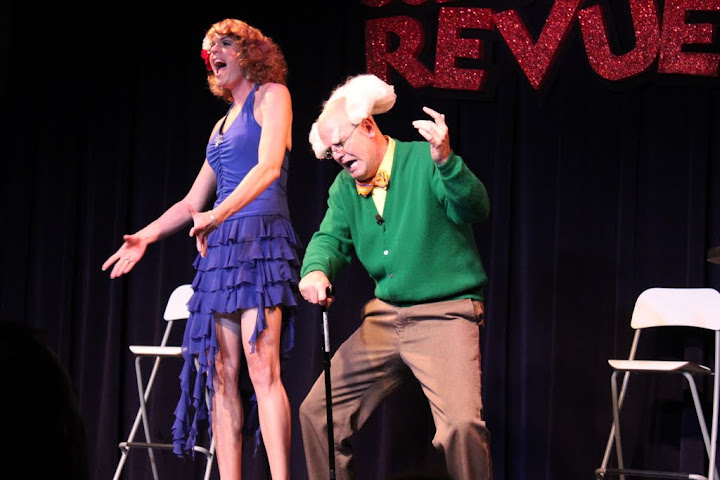
Didi Panache and Wayburn Sassy of the Screw You Revue

Didi Panache and Wayburn Sassy of the Screw You Revue

This post is written for any musician or performer, especially the independent theatrical types who depend on ticket sales to make their living. For some of these performers, they bounce from festival to festival and make a good portion of their income from their take. Some even use one festival to pay for the next one.

This is a strategy they can use to improve their take next year.

What You’ll Need

  • A laptop computer
  • A digital camera with video capabilities. If not, your laptop’s camera will do.
  • A Twitter account.
  • A blog (WordPress.com or Blogger.com are great free platforms, as is Posterous.com and Tumblr.com)
  • A YouTube account.
  • A Facebook page. (This is different from a personal profile. You want an Artist’s page.)

What You’ll Do

These are in a general chronological order, but not in a do-one-then-the-next lockstep order. I’m using the Indianapolis Fringe (#IndyFringe) as an example, but this will work for any concert, performance, show, or festival.

  • First, make sure your Twitter bio includes a line about the name of your show, or your most famous character’s name. If you only performed in one festival, put the name of that in the bio too. “You may have seen me at the #IndyFringe Festival!” You can always change your bio, especially as you move from festival to festival, or follow specific groups of people.
  • Start following people on Twitter. People will follow you back, especially once they see that you’re a performer at the festival they went to, and even moreso if they were at your show. To find people who were at the festival, do these steps:
    • Go to FollowBlast.com and do a search for #indyfringe, and follow anyone using that term. Keep in mind that these hashtags only work for about 30 minutes, so it’s actually a good idea to access this site while you’ve got some downtime at next year’s show.
    • Build a hashtag archive at TwapperKeeper.com. I’m still trying this out, but I’m hoping it will collect old hashtags, unlike FollowBlast.com. However, it only goes back 7 – 10 days, and back for 1,500 tweets. It will then go forward and continue to save tweets. You should set this up before your next festival starts. Work in conjunction with the festival organizers, because they may want to use your archive as well. Also, before you start, search to see if anyone else set up an archive before you so you don’t duplicate efforts.
    • Go to search.twitter.com as another way to search for #hashtags. Put in #indyfringe and see what you can find. Search results are somewhat limited, but you may be able to find older tweets that FollowBlast and Twapper Keeper couldn’t, especially if you’re seeing this now, and are scrambling to recover those old tweets.
    • If all else fails, try Topsy. It’s not 100% accurate, but it gives you more than you might get if you’re looking for a festival that ended three weeks ago.
  • Check out the festival organizer’s Twitter page and follow everyone they follow (not everyone who follows them). If they have been good Twitter stewards, they have vetted the people they’re following. Those people will include other performers, supporters, festival-goers, and other people in the industry or festival business. (This last group could be a good connection to getting into other festivals!) Do this with any festivals you plan on going to next year as well.
  • Use Twellow.com and Twellowhood.com as a way to find other people who are in the cities where you’ll be next year.
  • Why You’ll Do It

    Okay so far? You’ve built your Twitter list for a very important reason: Promoting stuff! You’re going to promote next year’s show through videos, your blog, and even email newsletters. Here’s how.

    Zan Aufderheide of Welcome to Zanland

    Zan Aufderheide of Welcome to Zanland

    • Now you need your camera. Start shooting some short videos. Update us on what you’re doing, where you’ll be, thoughts on stuff you did this year. Treat it like a diary. If you’re an actor playing a part, do it in character, especially if that character is going to be back at the festivals next year. Shoot the videos in character, or tell some jokes, or give people a preview of what you’ve been working on. Shoot some rehearsals, some special messages to individuals, or perform a new song.
    • Post those on YouTube.com (make them public), and make sure you fill out all the details, like Title, Description, etc. (all this stuff is indexed by Google, which makes your videos found more easily by people searching for you or the festival).
    • Share these videos on Twitter and your Facebook page, and post them to your blog (do the same with any photos you take). This will accomplish a lot of pre-show promo before you ever set foot in the city. And if you can get people buzzing about the show before you start, you’ll be selling out more shows.

    You can get a Flip camera for as low as $170 now, and if you think that’s still high, use the money you were going to spend on fancy-schmancy postcards and spend it on the camera instead. The postcards are immediately dated once the festival ends, and you can’t reuse them. The video camera will pay for itself with all the videos you shoot and the postcards you don’t buy.

    Finally, there are a few things you want to do next year, to get ready for the next off-season.

    • Build a mailing list of all your attendees. Send around a clipboard before your show begins, or have them sign up before they leave. Ask people for their HOME email, not their work email — especially if your show is laden with profanities and cross-dressers. Guard this with your life. Promise to never, ever spam them. Use it only for newsletters and occasional social media communication.
    • Load that list into a Gmail account (here’s why you should use Gmail), and then either use the Rapportive.com Gmail plugin, or upload the email list to Gist.com, to start finding where your list members can be found on the different social media networks. Follow them on Twitter, and connect with them on Facebook.
    • Send out an occasional newsletter — no more than once a month — and email it to them. Let them know what you’re working on for next year so they get excited about your upcoming visit. Give them an opportunity to unsubscribe, but try to give them useful information so they won’t want to.
    • Use your video camera to shoot post-show testimonials and get them up on your blog as soon as a show ends. Tweet the new blog posts to your Twitter network during the show, so you can continue to remind people you’re there and you’ve got an awesome show. Ask your Twitter network to retweet your show information, so they can help you spread the word.
    • There is so much more you can do with social media. Believe it or not, this is just scratching the surface of what can be done. But while it seems overwhelming, keep in mind two things:

      1. This will get easier as you do it more often.
      2. It beats the hell out of busking and handing out postcards in 90 degree heat.

      Photo credit: Erik Deckers

    Don’t Be a Jerk, Let Them Work: Too Many Check-Ins PSA [VIDEO]

    I realized I was becoming a check-in junkie when I noticed I had 6 geo-location networks on my phone (the only thing I didn’t have was Facebook Places, and I’m sure my Facebook for Android app has it already installed).

    I shot this video as a part of 12 Stars Media’s You Do Video program, on the Flip camera they provided me, with help from Meghan Barich’s @MeghanBarich help, as well as Pamela the Barista), and then was so ashamed that I actually had nearly all of the apps I named that I deleted Whrrl and Hashable, and saved myself over 10 GB of space on my phone.

    I also realized that there are just too many geo-location networks out there. I frequently use Foursquare, Gowalla, and Yelp, because I like their game psychology and the chance to win badges, pins, and titles. I like how retail stores and restaurants have embraced Foursquare to offer specials for check-ins. I like how Gowalla offers special “trips,” encouraging visitors to check out different places in a city, and I appreciate Yelp’s user-generated reviews of a restaurant, which help me decided whether to eat at a place or not.

    So I’m paring down to only those three, and while I may check out some other location-based apps in the future, especially any hyperlocal ones that focuses on a specific city, I don’t plan on adding any more. I may even drop one or two in the future, especially if Foursquare would ever add more user-generated reviews in the future, and not just tips.

    Five Reasons to Use Posterous as a Social Media Distribution Point

    Posterous.com Screenshot

    I’ve been enjoying playing with Posterous for about a year now, and while I don’t recommend it for everyone, it can be a great tool for some people. You should consider using Posterous if you are a:

    • Beginning blogger
    • Social media specialist
    • Mobile blogger
    • Crisis communicator

    Posterous is an email submission blog. You send your post as an email to your own Posterous.com address, treat the subject line as the headline, and any attachments you send are incorporated into the post itself. It’s not pretty at times, but if you need something fast, this is it. Plus, you can go in and edit stuff to make it look better later.

    Posterous.com Screenshot

    My Posterous.com blog

    I’ve often said, “Using a blog interface is a lot like sending an email.” Now, thanks to Posterous, it really is sending an email.

    Here are five reasons to use Posterous as a blog platform and social media distribution point:

    1. It’s ideal for mobile phone users. If you’re constantly on the go, and want to blog about the things you see, Posterous allows you to upload photos or videos to your site, along with any accompanying text. Posterous takes advantage of the overall computing power of today’s mobile phones. When I need to demonstrate Posterous during a talk, a few minutes before I go on, I’ll snap a picture of the gathering audience on my mobile phone, attach it to an email, and type in a couple of lines. Before my talk begins, I tell the audience, “I’m going to hit send on this email right now. You’ll see why it’s important in 10 minutes.” Then, when I get to that point in my talk, I show them my Posterous page, which has the picture of them. If you’re a crisis communicator or a mobile blogger, this is an ideal tool for communicating with the public on the fly.
    2. Posterous will automatically send videos and photos to other sites. I have tied my Flickr, Picasa, and YouTube accounts to my Posterous account; it also sends videos to Vimeo. Whenever I take photos or videos, and send them to Posterous, they are automatically uploaded to the appropriate networks. I don’t have to upload them first, and then download the embed code. The downside for anyone who is concerned about search engine optimization is that your digital properties are on Posterous, not on YouTube or Flickr, so you lose any search engine juice that would normally come from a well-optimized video or photo that links to your site. There are workarounds for this, but they take some extra time after your post has been uploaded. If you’re a social media specialist, you’ll love this feature.
    3. Posterous will automatically repopulate content to other blog platforms. You can tell Posterous to re-send your content on to your WordPress, Blogger, Drupal, TypePad, LiveJournal, Xanga, or Tumblr site. Publish a post on Posterous, republish it on your “official” blog. Yes, there are plugins and apps that let you email your posts in to these platforms, but they won’t necessarily upload your video and photos to YouTube and Flickr. Again, crisis communicators or mobile bloggers who need to get information out to several networks will love this feature.
    4. Tell Posterous NOT to post to certain networks. The default setting for Posterous is to repost everything to every network you want it to (i.e. email my post to post@posterous.com. But what if you have a photo you don’t want to send to Flickr, or you don’t want a post to show up on your WordPress blog? By using a specific email address — for example facebook+youtube+blog+twitter@posterous.com — I can tell Posterous to post to my different properties, but leave out a specific network. In this example, I’m leaving out Flickr.
    5. Posterous can automatically notify Twitter, Facebook, Google Buzz, etc. about new blog posts. Tie your Posterous blog into your different social networks, and notify your followers when a new post is up.

    7 Ways to Use Blogging to Promote Events

    We’ve often used blogging to promote special events for ourselves and our clients. I’m even a blogger for VisitIndiana, the website and blog for Indiana Tourism, our state government’s tourism department.

    1. Pre-event promotion: This is the one thing most people think of. But don’t limit yourself to a single blog post about the event coming up. Tie every blog post into your event. Blog about topics that tie into the event. For example, if you sell tradeshow displays, talk about the upcoming social media and tradeshow marketing panel discussion you’re going to host on June 9 at the Hilton Garden Inn. (By the way, I’m speaking at a panel discussion on social media and tradeshow marketing on June 9 for Skyline Exhibits – Indianapolis).
    2. Live blogging: This can be challenging, but it can also be fun, because it draws people into the energy of the event, especially if they’re not able to attend with you. I have live blogged at two sporting events. One was the 2009 Indianapolis 500. I had also spent several days in May on the track, blogging about different things I saw, which helped build up my readership for the big day. I also live-blogged from an Indiana Fever game, which I will never do again. As I was writing about a play, something cool would happen, and I would miss it. Now I just tweet the highlights and enjoy the game. The easiest way to do live blogging is to use the Email to Post feature on WordPress or Blogger, or set up a blog at Posterous.com. I especially like Posterous, because I can attach photos and they’ll automatically be placed into each post.
    3. Post-event wrap-up: You want to remind people of the good time they had, or tell them about the good time they missed so they’ll be sure to come back next year. Use this time to talk about what worked well, what could have been better, funny stories, traditions you might start, and photos of the great time people had. Ask attendees for suggestions about what they would like to see changed or kept the same.
    4. Photo blogging: Set up some slideshows on Flickr or Picasa, and paste the embed code into a blog post. You can show photos you’ve already taken, or embed the code early, and then add photos as you take them, which will expand the slideshow. This is especially great for live blogging. Just use a photo uploader on your smart phone, get an EyeFi card for your digital camera, or make sure you have a way to quickly download photos from your camera and then upload them to your photo sharing site. You will need to do some tweaking on your account, but you can start sharing the photos right away.
    5. Video blogging: The same techniques and ideas that you can use for photo blogging work for video blogging. I’m not talking about producing pre-written and edited videos. Rather, take some videos and upload them via your smart phone’s uploader, or YouTube. Take some quick interviews of event attendees, show some speakers/music/events/games, and post them as quick as you can. I especially like Posterous.com for photo and video blogging, because you can set up your account to automatically forward all photos and videos to their respective services when you email them to Posterous.
    6. Get other bloggers: Ask other people to blog about your event in all three stages, pre, during, and post. Give them free admission or tickets to come to your event and write about it. You want to find bloggers in that niche or industry, but don’t limit yourself to only finding the most popular ones. The ones who don’t have a lot of readers can still be valuable. For one thing, they’re reaching a group of people that the bigger bloggers might not. For another, any links they make back to your website help your search engine optimization (see #7), which makes it easier for people to find your event for next year.
    7. It’s all for Search Engine Optimization: It doesn’t matter if you got a lot of people to read about your event this year, or if only a few dozen people were following your blog at the time of the event. All this blogging does one additional thing for you: it builds your content out for search engine placement. If you’re going to hold your event next year, all the work you did this year will help you rank higher on the search engines for next year. This is true whether you’re hosting your own event, or whether you’re participating in someone else’s event. For example, if you’re taking photos, videos, and blogging about your participating at an arts festival, you’ll be one of the first names to pop up when people start searching for it again for next year.

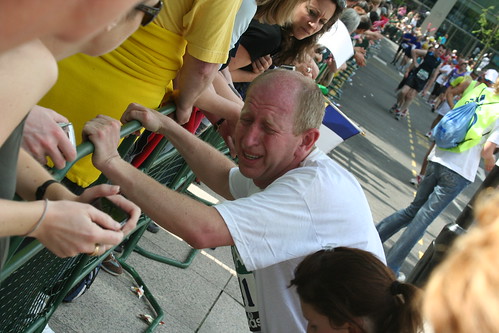
    Just remember, blogging is for the long haul too, not a just quick burst of publicity. It’s the marathon, not the spring. But it doesn’t hurt to have a fast start to get out in front of your competition either.

    Photo credit: MattIndy77 (Flickr)

    Bonefish Grill’s Corporate Videos Look Too Corporate

    I’ve become enamored lately with the use of videos to promote one’s brand, whether personal or corporate.

    Videos can be used for demonstrations, like the hilarious Will It Blend videos, for sharing information and expertise, like the BrandSwag TV videos I helped Kyle Lacy and Colin Clark produce, and corporate videos like the Bonefish Grill.

    I like the fact that Bonefish Grill has embraced social media. Since we’re going to eat there tonight, I thought I would check out their social media footprint.

    I found them on Foursquare, and learned they have a Twitter account (@bonefish) (hint: you should be following as many people as are following you: A 17:1,500 ratio looks like you don’t care what others have to say). From there, I found their Facebook page, and watched their latest video on making ceviche (above).

    Like I said, I’m pleased to see that the restaurant is using social media with such thoroughness. I just have a little bone to pick with them.

    Corporate Videos Should Not Look Corporate

    Video marketers understand that anyone who is using corporate video should try to make it look a little more natural and less high end. Believe it or not, videos that look less slick and more homemade tend to perform better in marketing tests, number of viewers, and even virality. Even the Will It Blend videos, while the image quality is great, still has a homemade feel to it.

    Videos that look professionally done have an air of artificiality about them, while the simple, basic video made with a Flip cam or a Droid or iPhone seem, well, sincere. This one looks like it’s part cooking show, part travel show, part commercial for Meyers Rum.

    And that’s my biggest complaint about the Bonefish video: the overt use of Meyers Rum in the video, without ever telling us they’re a sponsor, supplier, or just good buddies of Tim’s. That’s where it really begins to smack of insincerity and artificiality.

    Tim Curci and Rum Ambassador Robert Pallone squeeze in between several bottles of Meyers Rum to prepare some ceviche (awesome looking ceviche, mind you). Then at the end of the video, the bar owner brings out some rum runners with a little topper by Robert of, you guessed it, Meyers Rum.

    Now, I understand that Bonefish sells Meyers, and that they (hopefully) asked Meyers to underwrite this little video in exchange for some placement (if they didn’t, they’re missing out on a great opportunity). However, regardless of the arrangement, it looks less natural and more forced when Meyers gets prominent placement without any explanation of why.

    Don’t worry if they paid for the placement. You can tell us. No one is going to hold it against you. But it looks like you’re trying to hide it when you don’t mention why Tim and Robert are trying to avoid knocking over the display of Meyers bottles with their elbows.

    If I had to grade their effort on this video, I would give it a C, but they get a whole bonus letter grade for being on social media so thoroughly. The only restaurant I know that has embraced it more is Scotty’s Brewhouse (@brewhouse) (Scotty, I’d love to see a variation of Bang Bang Shrimp on the menu.)

    So, Bonefish Grill, you get a B for the video, because you’re firing on all the other social media cylinders.

    And even though I wasn’t a fan of the video, I’m going to try my first-ever ceviche tonight. Assuming I don’t stuff myself on Bang Bang Shrimp first.

    (Update: They didn’t have the ceviche tonight, so I had to resign myself to the Bang-Bang Shrimp and the fish tacos. Still a great meal. My prejudice against their videos does not cross over to their food.)

    My Talk at Blog Indiana Bloomington, January 2010

    I had a chance to speak at Blog Indiana’s first regional event in Bloomington, Indiana, at the Sproutbox office. (Sproutbox is a venture capital firm that works directly with startups to help them launch. And they’ve got a killer office, complete with liquor cabinet and three in-wall beer taps from the Upland Brewing Company.)

    Shawn Plew and Noah Wesley from Blog Indiana were kind enough to ask me to speak, so I talked about promoting a blog with social media. I discussed some of the tools I use to help our clients, as well as my own personal blog.

    Special thanks again to Sproutbox for hosting us, and to Scotty’s Brewhouse for providing us with some great food.