• Skip to primary navigation
  • Skip to main content
  • Skip to primary sidebar
  • Skip to footer

Pro Blog Service

  • Business Blogging
    • Blogging and Content Marketing for Search Engine Optimization (SEO)
    • Social Media Strategy and Consulting
    • Blogging Services
    • Content Factory
    • Need a Law Blog or Legal Blog?
    • Download Our White Paper: Business Blogging: The Cost of Corporate DIY Blogs vs. Ghost Blogger
    • Pro Blog Service Books
  • Blog
  • Speaking
  • About Pro Blog Service
    • Erik Deckers
    • 4 Simple Rules for Guest Posting on Our Blog
  • Get Ghost Blogging Quote
  • Link Sharing/Contributed Articles
You are here: Home / Archives for All Posts

All Posts

April 14, 2011 By Erik Deckers

Four Ways a Corporate Blog Can Help Your Company Increase Profits

A corporate blog is more than just a company diary where someone from marketing talks about the latest trade show. A corporate blog is a support tool that can lighten the load of several different departments within your company. Here are four ways a corporate blog can help your company.

1. Reduce Marketing Costs and Improve Reach

In the past, Marketing put a lot of time and money into developing, creating, and printing new sales literature and brochures. But once the specs changed on a particular product you got a new area code (it happened to my company in 2002), or you made an egregious error (guilty), the remaining 8,500 copies of the brochures were rendered obsolete, or you had to hand correct every single one of them with a black marker.

A blog can replace a lot of sales brochures and literature, introducing customers to the new product, letting them read the new specs, and finding out the latest features and prices. A blog will also let you show new photos and video demonstrations, tell people about the upcoming trade show or the show you just finished, or even post a video of the CEO talk about the product and what it means for the industry.

By turning to electronic publishing, you can reduce printing costs, reduce costs per lead, and ultimately, costs per sales.

2. Serve as a Newsroom

The PR department spends a lot of time chasing down the industry media or traditional media, trying to get them to talk about your latest product or service. The problem is, the media isn’t always willing to listen, or they can only publish on their own schedule, not yours. But by posting news articles to your website, you become the news source, not the traditional or industry media.

A blog will let you disseminate the latest news to your customers, helping your most loyal customers not only read what you’re up to, they can share it with their readers, which promotes your news as well. The media can use your blog as an information-gathering source as well. This lets them see what you’re doing, rather than waiting for a press release. They can find your press releases, product photos, and HD video clips, and get everything they need with ease. They can also get further information and details without calling your PR person while she’s on vacation and unavailable.

3. Sell to New Customers

Corporate blogging can greatly benefit the sales department, because salespeople can talk about the benefits of the new product, use blog posts to answer frequently asked sales questions, and preemptively overcome any objections potential customers may have.

While this won’t answer every question and objection for every customer, you’ll find that it cuts down on the time per sale. When I started selling on the Internet in the late-90s, I found I had cut my time per sales call down from 40 minutes to 10 minutes just because of the information I was putting on my website.

Again, this is where video demonstrations can be invaluable to potential customers. This also helps improve search engine rankings, so your site is more easily found during web searches, which means more customers could find you, which in turn means means more sales.

4. Provide 24/7 Customer Service

If you have a product or service that has frequent questions, don’t just rely on an FAQ section. Turn your blog into a knowledge center, and ask your customer service reps to write posts that answer those frequent questions. Make them as easy to find as possible (proper keyword tagging, links from the FAQ page, or even listing them in your “popular posts.”

Ask other customers to leave comments on individual posts about different fixes and solutions they’ve found as well. Incorporate their answers into the official blog posts to continue the discussion, and to make your customers feel like they’re contributing.

Finally, customers can search your website and find in-depth answers to questions they have. This saves phone calls about basic constantly-asked questions, which means you can help reduce customer service costs.


Filed Under: Blog Writing, Blogging, Blogging Services Tagged With: business blogging, customer service, marketing, public relations, sales

April 13, 2011 By Erik Deckers

It’s Still Corporate Blogging, Not the Social Web

Debbie Weil doesn’t like the term “blog” anymore. She wants to do away with it.

I was listening to Debbie on Doug Karr’s Blog Talk Radio from the end of February, and she said she doesn’t like the term “blog” anymore. Rather, she wants to call it the “social web,” since blogging has grown beyond a string of chronologically arranged thoughts by writers who wanted to journal publicly (I’m paraphrasing).

I couldn’t disagree more.

While blogging may be old hat to people like Debbie, Doug, and me, it’s still new to a lot of businesspeople, who are only just now hearing about it. They’re only just now hearing about social media. They have just recently quit calling it “Facespace,” and realize there might be something to allowing their employees to contribute to their website.

Some of these guys even have a website. (No, not the horse.)

Keep in mind, the business community still hasn’t embraced the Internet as a whole. According to Formstack, only 45% of businesses in the US have a website.

That’s a friggin’ website! That’s not even a blog.

I built my first website in 1994. On Adobe PageMill. It was horrible. But we were one of the first businesses in our industry to have one, and I’ve been online ever since.

It’s 17 years later, and more than half of the businesses in this country still don’t have a website. They’re certainly not thinking about a blog. Maybe they’ve heard of it, maybe they know someone who’s got one. But they’re not seeing the need to have one.

And if that’s the case, they’re certainly not ready to embrace the social-ness of their website, and stop referring to it as a blog, since they don’t even have one.

Cast of Decoder Ring Theatre, an audio theatre company in Toronto. They're airing 6 of my radio scripts this summer on their podcast.

I’ve seen this “we’ve got to stop calling it by the old name because it’s not accurate anymore” phenomenon so many times before in so many different industries. Radio theatre is no longer called “radio theatre” anymore, it’s called “audio theatre.” Why? Because you don’t listen to these plays on the radio anymore, you listen to them via streaming audio, podcasts, mobile phones, CDs, and even tapes. Who the hell uses radio?

The audio theatre groups I’ve been a part of have been arguing about this for the last 10 years. (In fact, if I want to rile them up, I’ll bring it up again, like shaking a jar of angry bees just as they’re starting to calm down.) But the only people who care about the distinction are the practitioners themselves. Most of the non-audio theatre public still calls it “radio theatre,” because that’s the name they know. That’s how they refer to it when they talk about what they, their parents, or their grandparents listened to.

When I ask them about “audio theatre,” they stare at me blankly, until I say “that’s the new word for radio theatre.” Then they get it. Audio theatre’s biggest marketing blunder was when they stopped calling the art form what the typical listener was calling it, and I think it played a role in the diminished acceptance of the art form, even as audiobooks and other forms of audio entertainment and education have taken off.

If we want corporate blogging to continue to grow, we need to keep calling it a “blog” for as long as the business community has not fully embraced the Internet as a whole. Once everyone has a website and a blog, then I’ll call it a “social web.” Until then, I’m going to stick with the term the rest of the business community is already using. The social media pros can call it whatever they like.

Photo credit: pullarf (Flickr)

Filed Under: Blog Writing, Blogging, Blogging Services, Communication, Social Media Tagged With: business blogging, Douglas Karr, websites

April 12, 2011 By Erik Deckers

Don’t Be a Jerk, Let Them Work: Too Many Check-Ins PSA [VIDEO]

I realized I was making too many check-ins when I noticed I had 6 geo-location networks on my phone (the only thing I didn’t have was Facebook Places, and I’m sure my Facebook for Android app has it already installed).

I shot this video as a part of 12 Stars Media’s You Do Video program, on the Flip camera they provided me, with help from Meghan Barich’s @MeghanBarich help, as well as Pamela the Barista), and then was so ashamed that I actually had nearly all of the apps I named that I deleted Whrrl and Hashable, and saved myself over 10 GB of space on my phone.

I also realized that there are just too many geo-location networks out there. I frequently use Foursquare, Gowalla, and Yelp, because I like their game psychology and the chance to win badges, pins, and titles. I like how retail stores and restaurants have embraced Foursquare to offer specials for check-ins. I like how Gowalla offers special “trips,” encouraging visitors to check out different places in a city, and I appreciate Yelp’s user-generated reviews of a restaurant, which help me decided whether to eat at a place or not.

So I’m paring down to only those three, and while I may check out some other location-based apps in the future, especially any hyperlocal ones that focuses on a specific city, I don’t plan on adding any more. I may even drop one or two in the future, especially if Foursquare would ever add more user-generated reviews in the future, and not just tips.

Filed Under: Social Media, Social Networks Tagged With: coffee shops, FourSquare, video

April 8, 2011 By Erik Deckers

Are There Too Many Geo-Location Networks?

A couple days ago, I shot a quick video for 12 Stars Media’s You Do Video program, spoofing all the different check-ins I could make on my phone. In the video, I checked in (pretended to; I was acting!) on 7 different geo-location networks.

The sad thing was that out of the 7 I named, I actually had 6 of them on my phone.

Now, I’m a regular Foursquare user. I’ve invested the most time and effort into it. And I’ve played with Gowalla, and I like that they create tours that users can take of different cities (I may even create my own tour for Indianapolis). But then there’s Whrrl (which Jason Falls got me to try), Hashable, Google Latitude, Yelp (I blame Thomas Ho for that one), and Facebook Places (the one geo-location network I refuse to use). I even signed up for Bizzy, but haven’t installed it.

Someone had the brilliant idea of creating a third-party app that would check in to all of your geo-location networks at once, but Foursquare and others said they wouldn’t give any points from those third-party check-in apps, so I gave up.

There are just too many damn geo-location apps to keep track of. I know there are at least a couple dozen more that I could be using. But I was so disgusted with my geo-whoring that I dropped Whrrl (sorry, Jason) and Hashable from my phone, and saved myself about 10 MB in space. I also removed Latitude from my home screen, and recommitted to not using Facebook Places. I’ll stick with Foursquare, use Yelp when I want to leave a restaurant review, and use Gowalla only on road trips.

What about you? What geo-location networks are you using? Or are you avoiding them completely? Let me hear from you.

Filed Under: Networking, Social Media Tagged With: Facebook, FourSquare, mobile phones

April 7, 2011 By Erik Deckers

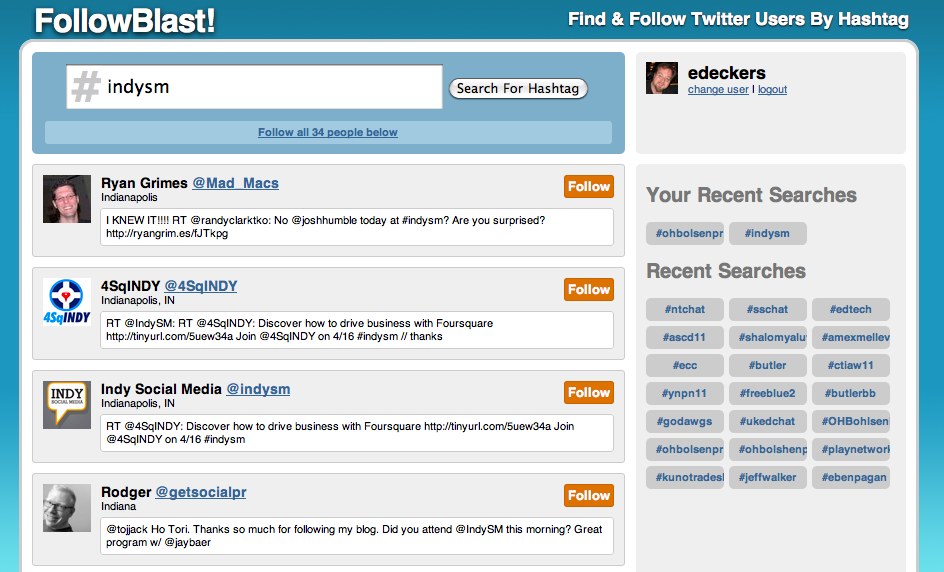
FollowBlast Allows Twitter Users to Connect Based on #Hashtags

It was the greatest thing at Blog Indiana 2010: someone on the stage mentioned BlastFollow.com as a way to follow a lot of people who were all using a specific hashtag, like, say #BIN2010. Everyone in the room immediately went to BlastFollow on their laptop and started using it.

Unfortunately, BlastFollow went away after Twitter upgraded their system, not allowing non-OAuth access to the API, blocking 3rd party apps that let you mass follow and unfollow people, and insert other geek mumbo-jumbo here; I can’t recall everything. TweepML.org was a suitable replacement for a while, until they shut down in October the site to make some repairs, promising to get the system back up two weeks later. It’s early April, and they’re still not back up.

FollowBlast.com is the new hashtag find-and-follow tool from my friends Noah Coffey (@NoahWesley) and Chuck Gose (@ChuckGose), and is something they just completed earlier this week.

I had a chance to check FollowBlast out right after the Indianapolis Social Media Brekafast, using the hashtag #indysm.

FollowBlast.com lets you find and follow other Twitter users based on their #hashtags.

The way FollowBlast works is that it pulls up the 50 most recent tweets that used that particular hashtag, and it lets you follow those people, either selecting them one at a time, or allowing you to mass follow those 50 people. (That’s how they get around the limits Twitter has placed on mass following/unfollowing.)

While the product is still very new, and has a few bugs to work out, it’s a great tool, especially if you go to a conference or event you’re not familiar with. It’s ideal for people who have newly joined Twitter and have an interest in a particular idea or event.

My one word of caution to FollowBlast users is that you do not use the Follow All link until you have checked out the results first. The first time I did it, I unintentionally followed someone I did not want to and had to go back and unfollow them.

The tool is supposed to filter out people you’re already following, but that wasn’t the case for my results, as most of them ended up being people I was already following. However, knowing Noah and Chuck, I’m sure that will be fixed soon.

FollowBlast has a promising future as a very useful tool for special event and conference attendees. It’s filling a very big hole that BlastFollow and TweepML have left, and as FollowBlast grows and improves, it’s going to become indispensable.

Filed Under: Networking, News, Social Media, Twitter Tagged With: networking, Twitter

April 1, 2011 By Paul Lorinczi

5 Key Steps for Good Customer Service in B2B Social Media

A couple weeks ago, while we were on our way to Chicago, Erik wrote about how people — customers — can get good customer service by participating in B2B and B2C social media. He talked about how customers can get a company’s attention, why they shouldn’t whine, and how to make sure they’re taken seriously when they have a real complaint.

But companies also need to follow some customer service “best practices” in the social media realm, if they want to see what the customers are talking about, and to avoid a serious customer service meltdown. We manage a lot of customer service social media for our clients, and have been able to solve a lot of problems on their behalf. Here are five steps we follow in providing good customer service in B2B social media.

1. Find your Customer Playgrounds

Facebook is not the only game in town to manage b2c social media for a company. More often than not, you’ll find your customers participating on sites that are specific to your industry. Social media and business can be found on Twitter, Blogs, Forums and other Social Networks.

For example, in the travel industry, whether it’s an airline, hotel or car rental company, they can keep an eye on their customers by hanging out on Flyertalk, where everyone is talking about everything from airline miles, aircraft and the luggage they use. By focusing on specific discussions, they can keep abreast of what their customers are concerned about and pleased with.

Most industries have their playground where people are congregating and talking about what you are or are not doing right. Find yours and participate.

2. Create a Team.

You need a team to monitor your brand online. Your best bet is to create a tiger team of different people from different departments, rather than assigning one department like marketing or customer service to it. However, you need to appoint ONE person to be in charge of it. Don’t make it a committee, because nothing will get done. Customer service definitely needs a seat at the table. Also, create a plan to quickly address a bad Twitter post or Facebook post. This is where customer service needs to be at the forefront.

3. Monitor the Networks.

It’s not just enough to have a Twitter account that you check for mention of your name (although you need to do that too). You need to monitor a lot of the different networks and forums. There are several tools to help, including Lithium (formerly ScoutLabs), uberVu, Radian6, Vocus, and of course, Google Alerts.

There are more entering the social media monitoring market everyday, so the list is fluid. Find one that does what you need and stick with it. But be prepared to change, since the quality of the lists will often change.

4. Have a Plan to Respond.

Make sure you you always address the issue and deal with the customer. Don’t engage in an argument with them. Whether you think you’re wrong or they’re right, don’t engage in a public debate. If the customer is just dead wrong, address the issue privately, but solve their problems publicly. Let everyone see you’re taking care of your customers; this will help potential customers feel more at ease. But if you get into an argument with a customer publicly, you’re going to lose when everyone else sees you as a bully.


Step 1: Research the person who posted their comment.

    • Do they have Klout?
    • Have they identified themselves?
    • How much influence do they have?
    • Are they a troll? (There are individuals that go around and say bad things and try to extort you to remove the comment.  And, they may not even be a customer or have purchased your product).

Step 2: If they are legitimate, address their issue.

See how easy that is?

5. Communicate the effort, so you are demonstrating action is being taken.

Demonstrate that you are conversing with your customers and answering the questions. The passive aggressive behavior of online behavior quickly turns into appreciation, if the customer feels heard. Someone may complain “Smitty’s restaurant ruined my day. Put Swiss, not American, cheese on my cheeseburger. #FAIL,” but will backtrack and soften their complaint if you follow up with “I’m sorry for the error. We’ll buy your lunch the next time you’re in.”

Remember, social media is about having conversations with your customers online. Monitoring what people are saying allows you to get important feedback you would not otherwise get. Feedback is good, embrace it.

Filed Under: Communication, Reputation Management, Social Media Tagged With: customer service, Social Media

  • « Go to Previous Page
  • Page 1
  • Interim pages omitted …
  • Page 55
  • Page 56
  • Page 57
  • Page 58
  • Page 59
  • Interim pages omitted …
  • Page 71
  • Go to Next Page »

Primary Sidebar

Subscribe via RSS

Categories

Tags

advice bloggers blogging blog writing books book writing business blogging citizen journalism content marketing copywriting crisis communication digital marketing Ernest Hemingway Facebook freelance writing ghost blogging ghostwriting Google grammar Jason Falls journalism language Linkedin marketing media networking newspapers No Bullshit Social Media personal branding public relations public speaking punctuation ROI SEO Social Media social media experts social media marketing social networking storytelling traditional media Twitter video writers writing writing skills

Archives

Recent Posts

  • The Enshittification of Evernote and Why I Quit Them
  • 11 Tips for New Digital Nomads
  • 13 Things to Do or Not to Do When Connecting With Me for the First Time
  • Why You Need to Write Your Memoir
  • How to Give a 6-Minute Presentation at 1 Million Cups

Footer

BUY ERIK DECKERS’ LATEST BOOK

Erik Deckers' and Kyle Lacy's book - Branding Yourself now available at Amazon

Request a Quote – It’s easy

We write blog posts, manage social media campaigns, write online press releases, write monthly news letters and can write your website content.

Let's figure out the right package for you.

FREE 17 Advanced Secrets to Improve Your Writing ebook

Download our new ebook, 17 Advanced Secrets to Improve Your Writing

Erik recently presented at the Blogging For Business webinar, and shared his presentation "12 Content Marketing Secrets from the Giants of Fiction.

If you attended the event (or even if you didn't!), you can get a free copy of his new ebook on professional-level secrets to make your writing better than the competition.

You can download a copy of free ebook here.

© Copyright 2020 Professional Blog Service, LLC.

All rights reserved. Use of this site indicates your consent to our Privacy Policy and Terms of Use.

1485 Oviedo Mall Boulevard Oviedo, FL 32765
Call us at (317) 674-3745 Contact Us About