My Keynote Talk at Blog Indiana

Erik Deckers speaking at Blog Indiana 2011

Last month, I got to do something I’ve wanted to do for the last four years: give a keynote speech at Blog Indiana. While it wasn’t my first keynote, it was going to be a special one because I had been attending Blog Indiana since it started. In fact, I think I have given more talks than anyone at the history of Blog Indiana, mostly because one year I not only gave two talks, I gave them twice.

But this was going to be the big one, the one I had hoped for when I first started bugging the organizers about it two years earlier.

I also knew I needed something new to talk about. Something that went beyond my typical 10 Secrets for Promoting Your Blog or 10 Ways to Build Your Personal Brand.
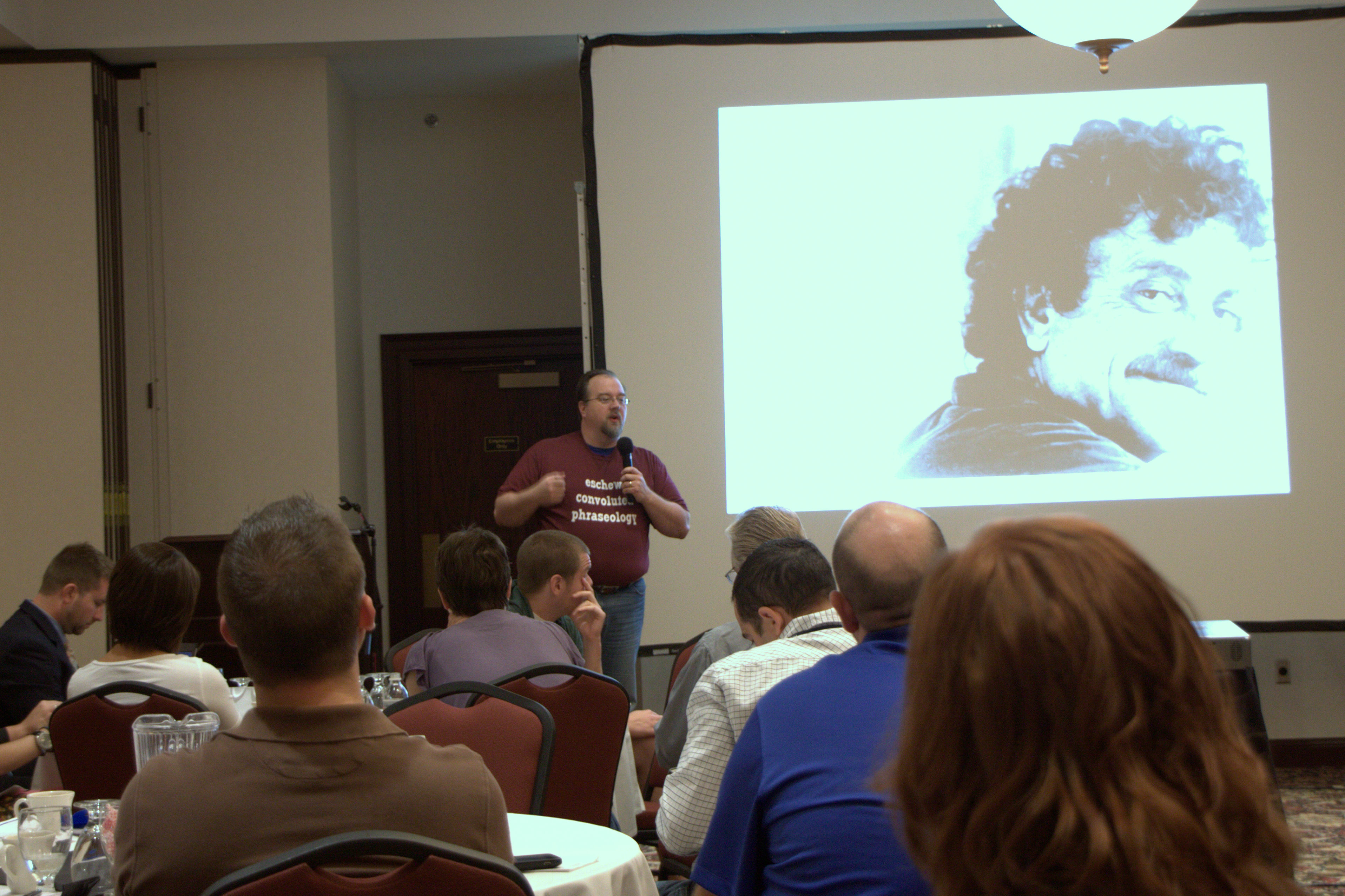
Erik Deckers speaking at Blog Indiana 2011

The t-shirt, courtesy of ooShirts, says "Eschew Convoluted Phraseology." It means "avoid big words."

So I decided to focus on writing as my topic, but because I can never get away from 10 Secret Anythings, the topic was 10 Secrets I’ve Learned in 24 Years of Writing.

I’ve spent the last 24 years writing just about anything you can think of: books, newspaper columns, web copy, brochure copy, technical manuals (I hate these with a burning passion, by the way). I’ve written stage plays and radio plays. I’ve even written speeches for a US Congressional campaign.

And in those 24 years, I have learned that it’s the language that’s most important, and how you use it. It hasn’t been the experience, the knowledge of the industry, or whether I have experience with a certain type of writing. It’s whether I have a good grasp of how to use language effectively.

So I talked about important aspects of writing that have defined my own writing career — focusing on one aspect of writing you want to improve, and then doing it everywhere; know when you can, or even should, break the grammar rules; and, not to let your love of your words get in the way of good editing and improvement.

I even dropped the F-bomb in my talk to illustrate how words that represent the worst of what we do — like killing and torture — too casually, as in “my feet are killing me” and “traffic was torture today,” but the word that describes how the best thing we do — make other humans — is an awful word that is horrible to say.

I even had a special t-shirt made for the occasion, thanks to the generosity of ooShirts, who gave me a couple shirts as part of their promotion. So I got a writing related shirt that said “Eschew convoluted phraseology,” which is the ironic — some might say snotty — way of saying “avoid big words.” I also got a second one to give away, which Brooke Randolph won by being chosen by random after sending out a special tweet.

I had a great time speaking, and have finally achieved my goal of giving the keynote at my favorite conference. Thank you to everyone who was there, and for the kind words during and after the talk. And special thanks to Shawn Plew and Noah Coffey for allowing me to speak.

Author :  •  Content Location : Indianapolis, IN  •  Copyright Year : 2011  •  Headline : My Keynote Talk at Blog Indiana - 10 Writing Secrets I've Learned in 24 Years  •  Keywords : writing, Blog Indiana, keynote  • 

Three Ways to Overcome Presentation Technology Hiccups

You’re setting up for your presentations, the room is filling up, and Bzzzzzz — the projector isn’t working.

Crap!

The presentation you and your friend have spent a few hours working on is down the toilet, because your computer and the projector aren’t talking to each other. That happened to me and my friend, Dana M. Nelson, as we were getting ready to speak to the MWBE Central Indiana Resource Fair.

Erik Deckers and Dana M. Nelson speaking at the MWBE Central Indiana Resource Fair on July 12, 2011

Erik and Dana speaking about social media and personal branding. This is the only photographic evidence we have.

We plugged in my computer — I always insist on using my Macbook, because it “always” works — but the projector wouldn’t detect it. Cords are plugged in properly, and everything should be running, but no dice. We plugged in Dana’s computer, and nothing. Hers is a Windows machine, so we decide to blame the projector, and go on with the presentation.

“We weren’t going to talk about a lot of tools today,” we tell the crowd, “but you still may want to write stuff down.”

Dana and I have given enough presentations that we were able to unplug the projector, shut it off, and just start talking. The facility staff brought in another projector about halfway through, and we managed to plug it in while we were talking. But it wasn’t even necessary. How so?

Here’s why and how we were able to manage our presentation so easily, despite not being able to show the gorgeous presentation we had worked so hard to create.

1. Don’t use a lot of text on your slides.

This is a given anyway: if you have more than 5 – 7 words on a slide, that’s too many. Keep your text limited to headlines with a large photo that takes up the entire background. Remember, people are there to see you speak, not read what you wrote. If they wanted to do that, they would read your blog. They’re there to watch you.

If your presentation relies on those visual elements and will fail without them, then you’re not speaking, you’re reciting.

Our slides only had headlines, so we just used my laptop as a reminder of what we were going to talk about next. And since the slides were basically functioning like bullet points — “Social media is not about selling” — we could talk for several minutes about that point without ever having to refer to any other words on the screen.

2. Don’t rely on online technologies for your presentation.

That means don’t create online Prezi presentations and leave them up there. It means don’t upload your presentation to Slideshare and assume you’ll access it through someone else’s computer. It means don’t include embedded YouTube videos hoping they’ll come through on your slide deck.

Basically, if you think you’ll need wifi to give your presentation, change it. Download your Prezis, copy your slide deck to a USB stick (export it to PowerPoint if you’re running Keynote for Mac), and download your videos. (I hope it goes without saying not to download copyrighted material.) Try to run everything off of your own laptop, not over wifi. Apparently there were some issues in getting the wifi to work in our area, so if we had depended on it for our own presentation, we would have been dead in the water, not even able to access the deck so we could remember our 10 secrets.

3. Know your stuff cold.

Dana and I have been speaking about social media for more than three years. We know this material so well that we could just start talking about it at the drop of a hat. Scramble up our slide deck, and we could have gone on without batting an eye. But that comes with talking about social media and personal branding for years.

If you don’t have the luxury of having years, or even months, of experience, then start studying for your next presentation. Write about the different points of your material, especially on a blog. Discuss it over lunch with friends. Tell them about the subtle nuances of a particular topic. Say your presentation out loud in the car to and from work. And then write about everything some more. Boil everything you want to throw on a single slide down to those five words, and then learn 3 important points about that particular concept.

If you can recite this information cold, it won’t matter if your projector is working or you can’t get wifi. All you need is your laptop and your slide deck so you can use it to keep your place in your presentation. If you don’t have that, write your main points out on a piece of paper and work from that.

As long as you prepare for things breaking down and you know your stuff cold, you’ll give a killer presentation, regardless of what may happen.

Photo credit: Kyle Lacy (Instagram). Thanks, Kyle!

5 Technology Tips For Presentation SUCCESS

I use my computer all the time for my presentations. Even today, I’m one-fourth of a panel discussion at an At The Top strategy session, and I have 4 slides. But I’m never worried that I’m going to run into any serious problems, mostly because I have a Mac and use Keynote (Apple’s presentation software), and never have to suffer the ignominy of a PowerPoint crash.Erik Deckers speaking about promoting your blog with social media

But that doesn’t make me completely immune, just lucky so far. And Stever Robbins’ (Get-It-Done Guy) latest podcast, How to Use Your Computer in Presentations, reminded me that things can still go wrong, even if you are using the best computer in the world (not Apple. Just my computer. Possession is nine-tenths of awesomeness.)

Stever’s five tips are useful, and God knows I’ve used them many times (except for #4. I don’t do handouts).

Tip #1: Prepare Your Computer for the Presentation
Tip #2: Have Websites Ready to Go
Tip #3: Use Screen Shots Instead of Live Sites
Tip #4: Give People Handouts with Critical Elements
Tip #5: Rehearse, Rehearse, Rehearse

But I have my own tips, even a couple I’m swiping from Stever.

  1. Get a Mac. If you make a living giving presentations, or you’re trying to be a professional presenter, get a computer that’s not prone to virus attacks, crashes, and glitches. And I know, I know, there’s Windows 7, and Macs aren’t immune, and blah blah blah. But that’s not my point. A Mac is less likely to suffer these things, and less likely to crash then a Windows machine. You can decrease that possibility if you combine this with tip #2

  2. Only use your computer for presentations. You hear a lot of stories about someone’s PowerPoint crashing and revealing several embarrassing photos or websites they were visiting right before the presentation. While you can clear your web history and disk cache, and keep those “special” photos hidden in a secret folder, your better bet is just to never visit those kinds of sites or collect those kinds of photos. Or at least don’t put them on your presentation computer.

    I’ve said before, if you don’t want skeletons in your closet, don’t stick the bodies in there in the first place. But if you must, just stick them in a different closet. Remember, if you’re trying to make a living through public speaking, you need to keep your computer in excellent working order. If you do a lot of work on your laptop, and you have the occasional problem, get a second presentation computer, keep it clean and pristine, and you’ll avoid those crashes and oops moments.


  3. Upload your slide deck to SlideShare.net before you give your presentation. I’ve been in rooms before where they had everything hard wired in, including the computer, and I was forced to use their system instead of my own. While I could export my deck to a PowerPoint version, this really screws up the formatting and fonts. Instead, I can upload my deck to SlideShare, log on to the system (since their computer is already safely connected to their network), and pull up the deck in full presentation mode. It means I have to stand next to the keyboard to change the slides, instead of using a remote, but I don’t have to futz around with creating a PowerPoint ready version of each talk I give.

    Later, you can give people the URL to your deck, rather than wasting the paper on creating 50 copies of handouts, and giving them out to the 20 people who showed up. Upon which time, they will be stuffed into their conference bag, thrown on the floor next to their desk when they get back to the office, and promptly forgotten about until 6 months later when they’re doing spring cleaning.


  4. Always carry a monitor cord with you. I always ask the organizers if there is going to be a projector available when I’m speaking. Every time except one has there been one. However, they don’t always have a monitor cord. I carry a monitor cord and a Mac adapter with me, so if I’m ever caught out, I’m safe. I’ve never needed the cord, but I always use the monitor.

  5. Insist on using your own technology. This is the only way you can be absolutely sure everything is going to work. It’s your stuff, you’re familiar with it, and you know how it works. If you use someone else’s system, you’re at their mercy, especially if you haven’t used that particular operating system or setup. I’ve been in this situation before, and knew more than the technical support guy who was supposedly there to “help” me.

    I’ve avoided future problems by just asking for the projector and bringing my own stuff. Organizers are usually happy about this because it’s one less thing they have to worry about. (The tech guys might not be, and may throw a fit if you happen to unplug their presentation monitor to plug in your laptop, but if you wait until they’re not around, what they won’t know won’t hurt them.

  6. This is what has worked for me for the past few years. How about you? What tips do you have to make sure your presentation come to a screeching halt, or your computer doesn’t crash? Leave a comment, and let me hear from you.

    Photo credit: my friend Noah Wesley, co-organizer of Blog Indiana (via Flickr)