Category: Research Desk

No One Likes My New Job Title

It was a brief spark of an idea, and one I got a little excited about: I wanted to change my job title.

I am currently the VP of Operations and Customer Service. It’s a little wordy, but accurately describes my position here. (I’m also a co-owner.)

“I know,” I said to myself. “I’ll change my title to Chief Blogging Evangelist. That’ll be cool.”

I asked Paul Lorinczi, my business partner, about it, and he said it sounded kind of buzzwordy.

“Bah!” I thought, and emailed Jason Falls whether he thought the title sounded “cool” or “eww.”

I’d say “content” evangelist to stay hip with on- and off-site services.
I don’t think it’s bad. Not necessarily “cool” but not bad.

So I threw it open to my Twitter network. We’re always preaching about using one’s network, so this was going to be my chance to do it. I was looking for confirmation that Chief Blogging Evangelist was a cool title, and that it would help me land more speaking gigs, and make me look really cool (I mean, cooler) when I go to my high school reunion next month.

I received 37 responses on my SurveyMonkey.com survey, and was stunned at the results.

Question #1: When I first saw the title “chief blogging evangelist,” my first reaction was:
Love it!
Meh
Don’t care for it.
That’s stupid.

Out of 37 responses, 1 person loved it.

(One person?! And I didn’t even vote! What the hell? This is cutting edge! This is Job Title 2.0. This is the epitome of social media coolness. And only one person liked it? If I didn’t know any better, I would think my mom had voted.)

It gets worse: 15 people thought it was “meh,” 11 people “didn’t care for it,” and 10 people thought it was “stupid.” In other words, 21 people either didn’t like it or downright hated it.

In question #4, (I think the title “Chief Blogging Evangelist:”), 36 people said it was either too buzzwordy or trendy (23), or it would scare off customers (13).

If I ever wanted proof that I can have some fairly dumb ideas, my Twitter followers and SurveyMonkey just showed it to me. (Except I didn’t want proof. I like being blissfully ignorant and thinking my ideas are awesome.)

So I asked for a few alternatives. And people were very helpful and creative. Some of my favorites were:

  • VP, Verbal Artistry
  • VP of Social Media
  • VP of Creative Services
  • Creative Vice President of Operational Services
  • Chief Social Media Evangelist
  • VP of Communications
  • Chief Blogging Atheist
  • Big Daddy Blogger

But my favorite response was:

  • It made me laugh, but then I said “seriously?”

So, I don’t know what my new job title will be, or if I even need one. But I know what it’s not going to be.

Of course, “Big Daddy Blogger” has a nice ring to it. I wonder what that would look like in a Garamond. . .

PG
About the Author: Erik Deckers
Erik is the VP of Operations & Creative Services for Pro Blog Service. He has been blogging since 1998, and has been a published writer for more than 22 years. He has written humor newspaper columns, business articles, radio and stage plays, and is currently working on a novel. He helped write Twitter Marketing for Dummies, and is writing two other books on social media and networking. Erik frequently speaks on blogging and social media.

Who has time to do the work today?

Clock - who has time to get work doneThere has been a lot of news lately on how companies are really not hiring right now. A recent report talks about how a companies are hiring temp workers, but they are not hiring them to stay. In the past, a common practice was to test drive a worker then offer them a position. Hiring them as full-time employees is not happening right now.

So, who is getting the work done?

When I joined ATA Airlines back in 1997, George Michelsons brought in Bain and Company to basically prepare the company for sale. The process was to get rid of a lot of people and put more jobs onto fewer people. While this strategy worked around the country for Bain, it usually preceded an upgrade in office automation to ensure the work could still get done.

The office automation phase did not occur at ATA Airlines.

The result was a lot of stressed out people carrying around their imaginary trays trying to figure out how they were going to fit one more item onto an already heavy load. No longer were people interested in teamwork, they were more interested in self-preservation. It created a lot of ill-tempered people in the process.

As some of my clients reveal their corporate cultures, I am finding similarities to what I experienced at ATA Airlines. No one has time to commit to anything above and beyond what their core responsibilities are. According to the Wall Street Journal, it is not projected to get much better – CEO’s are reluctant to hire.

What are the solutions?

The easiest is what is being done by some today. Hire temp workers to get things done. They may cost a little more in the short-term, but allow you to avoid the headaches of hiring employees and their costs over the long-term. There are a lot of companies providing these services.

Sometimes, just hiring a grunt worker is not enough. Sometimes you need a professional person to do the work, you don’t have time to do. There are companies being set up that can act as your Marketing Department, your Accounting Department, or your HR Department. They can do it at a cost that is far cheaper than hiring full-time employees, but are focused solely on getting work done for you.

So, look around and ask yourself, are you and your colleagues a bunch of stressed out grumpy people not really accomplishing much because there is too much to do? There is help out there that can help your company meet its strategic goals for the year.

We actually put together a white paper on the ROI of outsourcing blogging and social media. You can download it here, if you want to take a look.

PG
About the Author: Paul Lorinczi
Paul Lorinczi is the President of Professional Blog Service. The goal of the company is the help clients use Blogging and Social Media to expand their business online through planning, execution, and measurement.

A Year in Review

Professional Blog Service started a year ago out of Indy Associates to assist companies in generating content they need for most of their Internet marketing activity.

While at Indy Associates, we always recommended blogging as a good Search Engine Optimization (SEO) strategy. With the popularity of social media sites like Linkedin, Facebook and micro-blogging service Twitter, the strategy has become even more important. The challenge for most of our customers was the blog content generation. Most companies do not have trained content writers that are able to develop conversational blog content, while writing for the search engines. Most important, many of clients have great ideas with no time to share them.

So, what have we learned in 2009?

Most companies still do not have the resources, or the time to write their own content.

2009 saw the unemployment rate hit 10% in November. It was reported that many companies laid off many in their workforce leaving those left behind with more work to do and little time to get it done. The last thing on anyone’s mind is getting blog content written, even though everyone agrees that marketing is still important in a down economy.

Blogging and Social Media continue to evolve from AOL of the 90s to Facebook, Linkedin, and Twitter heading into a new decade.

“Two-thirds of the world’s Internet population visit social networking or blogging sites, accounting for almost 10% of all Internet time, according to a Nielsen report published in March of this year, “Global Faces and Networked Places.” These numbers keep rising as the year progresses. By 2012, IBM predicts that globally, a quarter of the global population will be using social media in some form.

Results still matter to most companies.

Learning how to play in social media is one thing. Getting people to interact with you is another. Your clients may or may not interact with you through social media. The challenge for all companies is finding out which ones they should engage. You may be able to sell like Dell, or respond to customer complaints like Southwest Airlines and Jet Blue Airlines have done. (Note to my former colleagues at American Airlines – take note!). Either way, Social Media and Blogging is measurable in some way depending on the strategic approach you take with it.

There are great tools like Yahoo Analytics (shameless plug as we are a Yahoo Analytics consultant). Radian6 and Scoutlabs can track who’s talking about you, and help you decide whether to act on the positive or negative media being generated.

We predict that 2010 will be the year of results with blogging and social media. In a nutshell, you are doing it to build your marketing list, or to generate interest in your products or services. To succeed, you will need:

  1. An understanding of how your market uses blogging and social media, if at all
  2. A plan to participate
  3. Execution and commitment to the plan
  4. Measurement of the results over the course of the year, not a month

If you can learn how to do it before your competition, you win. It will take them 12 months just to figure out what you have done.

Happy New Year from Professional Blog Service

PG
About the Author: Paul Lorinczi
Paul Lorinczi is the President of Professional Blog Service. The goal of the company is the help clients use Blogging and Social Media to expand their business online through planning, execution, and measurement.

Content is STILL King

Jeff Bullas has written a post on a study he found called the “Internet Activity Index” released by  the Online Publishers Association.  The study shows how content sites are still King of the Internet for both eyeballs and time.

Here are the highlights of the study:

The 5 Categories and the the types of sites that were measured were:

  • Content (Sites like NYTimes.com, ESPN.com and Edmunds.com (Content sites)
  • Communications (websites offering email, and Instant messaging)
  • Community (Facebook, MySpace and LinkedIn)
  • Commerce (such as Ebay, Amazon)
  • Search (Google, Yahoo, Bing etc)

Here is Jeff’s interpretation:

The study on online activity titled the “Internet Activity Index” released by  the Online Publishers Association shows the  trends of the types of activity that have occurred on the Internet over the past 6 years. The study’s findings has important implications for online marketers and how they should be focusing their time, resources and strategies in 2009 and beyond.

Five key findings of the study?

  1. Internet users continue to spend a majority of their “time” with Content sites, up from 34 percent of total time spent in 2003 to 42 percent in 2009.
  2. Emergence of Community (it wasn’t measured in 2003 as it wasn’t statistically significant enough and not on the radar)
  3. Content is still king; the content rich sites continue to be a place where consumers spend the majority of their online time and provide an environment for brand marketers to reach and engage with consumers despite the emergence of  community sites like Facebook, LinkedIn and MySpace.
  4. Community sites are reducing the share of online time by communications sites due to community sites ability to offer the same activities such as email and instant messaging more efficiently.
  5. Time spent with Search doubled.

Here is the report as it is reported on the Online-Publishers Site:

Share of Time Spent Online (%)
Jul08 Aug08 Sep08 Oct08 Nov08 Dec08 Jan09 Feb09 Mar09 Apr09 May09 Jun09 Jul09
Commerce 14.1 13.5 13.1 12.8 14.3 16.0 14.1 13.4 13.2 13.3 12.8 11.0 10.9
Communications 28.2 29.0 28.7 28.0 26.5 25.9 26.5 27.4 27.0 26.4 26.3 25.2 24.4
Community 9.0 8.9 8.3 8.7 9.7 9.7 11.3 12.6 12.8 13.7 14.5 18.5 20.6
Content 43.4 43.2 44.6 45.3 44.5 43.2 42.8 41.1 41.5 41.3 41.1 40.6 39.6
Search 5.3 5.3 5.3 5.2 5.0 5.3 5.3 5.4 5.5 5.3 5.3 4.7 4.5
% Change in Share of Time, Month-Over-Month
Jul08 Aug08 Sep08 Oct08 Nov08 Dec08 Jan09 Feb09 Mar09 Apr09 May09 Jun09 Jul09
Commerce 3.4 4.3 3.0 2.3 11.7 11.9 11.9 5.0 1.5 0.8 3.8 - 0.9
Communications 2.4 2.8 1.0 2.4 5.4 2.3 2.3 3.4 1.5 2.2 0.4 - 3.2
Community 2.3 1.1 6.7 4.8 11.5 0.0 16.5 11.5 1.6 7.0 5.8 - 11.4
Content 2.6 0.5 3.2 1.6 1.8 2.9 0.9 4.0 1.0 0.5 0.5 - 2.5
Search 1.9 0.0 0.0 1.9 3.8 6.0 0.0 1.9 1.9 3.6 0.0 - 4.3


*Notes: Excludes .gov and .edu Web sites, as well as pornographic domains. Percentage change indicates the percentage increase or decrease from the previous month’s value (June 2009 % change not shown due to introduction of Nielsen’s NetView RDD//Online data). Share of Time data based on Total Time values.

Source: OPA and Nielsen Online

For years now, the principals here have been preaching that content is king.  Not only for search engine optimization (SEO), but also for it being the hub of a social media campaign.  A colleague of mine, who is the Chief Marketing Officer of a large travel company has validated these findings with their strategy.  Quote:  “Blogging is the hub of a social media campaign.  Social Media alone is not a strategy for corporations wishing to participate.”

The numbers Jeff shared this morning kind of validates this approach.  From a hub, there are spokes to other platforms through sharing.  The valuable asset is the content generated.

PG
About the Author: Paul Lorinczi
Paul Lorinczi is the President of Professional Blog Service. The goal of the company is the help clients use Blogging and Social Media to expand their business online through planning, execution, and measurement.

The Case Against Do It Yourself Business Blogs

Recently a potential client tried to make the case that writing their own blog made financial sense because it “was cheaper”. So we sharpened up our pencils and analyzed what it really costs to write your own blog in three different scenarios:

  1. A corporation where technical experts (think engineers, accountants, lawyers, sales managers, marketing managers or executives) would be writing their own blog posts.
  2. A company that uses lower level clerical help to write the company blog.
  3. A small business where the owner is writing her own blog posts. In this case the owner is literally working for free.

Here’s how the numbers worked out:

Scenario One: Technical Experts
This is the most common situation we encounter: companies with knowledge workers who write their own blog posts. Compared to our highest-end product, the practice of using your own people may cost three times as much annually and offers little or no comparative advantage.

Knowledge Worker Professional Blog Service Platinum
Assumptions Assumptions
Worker Annual Salary $85,000.00 Worker Annual Salary n/a
18% Benefits & Tax Load $15,300.00 18% Benefits & Tax Load n/a
Annual Loaded Salary $100,300.00 Annual Loaded Salary n/a
Hourly Rate $48.22 Hourly Rate n/a
Company Income/Hour $144.66 Company Income/Hour n/a
Blog Post Costs Blog Post Costs
2 hrs labor to write & post blog $96.44 2 hrs labor to write & post blog n/a
Lost income on two hours labor $289.33 Lost income on two hours labor n/a
Cost Per Blog Post $385.77 Cost Per Blog Post $135.00
Monthly Cost @ 14 Posts $5,400.77 Monthly Cost @ 14 Posts $1,890.00
Annual Cost of Blog $64,809.23 Annual Cost of Blog $22,680.00

Scenario 2: Clerical Workers
Smarter companies utilize internal resources better, so instead of having expensive knowledge workers do the writing, lower cost clerical or creative workers are used.  The result: Professional Blog Service’ midrange ghost blogging offering is less than half the cost.

Midsize Company Example Professional Blog SMB
Assumptions Assumptions
Worker Annual Salary $35,000.00 Worker Annual Salary n/a
18% Benefits & Tax Load $6,300.00 18% Benefits & Tax Load n/a
Annual Loaded Salary $41,300.00 Annual Loaded Salary n/a
Hourly Rate $19.86 Hourly Rate n/a
Company Income/Hour $59.57 Company Income/Hour n/a
Blog Post Costs Blog Post Costs
2 hrs labor to write & post blog $39.71 2 hrs labor to write & post blog n/a
Lost income on two hours labor $119.13 Lost income on two hours labor n/a
Cost Per Blog Post $158.85 Cost Per Blog Post $55.00
Monthly Cost @ 14 Posts $2,223.85 Monthly Cost @ 14 Posts $770.00
Annual Cost of Blog $26,686.15 Annual Cost of Blog $9,240.00

Scenario Three: Small Business Owners
When a small business owner works inside her business, often the labor is viewed as having no direct cost. It does have an opportunity cost. Even working for free, a small business owner would have made more money having outsourced blog writing to Professional Blog Service using our top of the line service:

Small Business Owner Professional Blog Service Platinum
Assumptions Assumptions
Worker Annual Salary $35,000.00 Worker Annual Salary n/a
18% Benefits & Tax Load $6,300.00 18% Benefits & Tax Load n/a
Annual Loaded Salary $41,300.00 Annual Loaded Salary n/a
Hourly Rate $0.00 Hourly Rate n/a
Company Income/Hour $120.00 Company Income/Hour n/a
Blog Post Costs Blog Post Costs
2 hrs labor to write & post blog $0.00 2 hrs labor to write & post blog n/a
Lost income on two hours labor $240.00 Lost income on two hours labor n/a
Cost Per Blog Post $240.00 Cost Per Blog Post $135.00
Monthly Cost @ 14 Posts $3,360.00 Monthly Cost @ 14 Posts $1,890.00
Annual Cost of Blog $40,320.00 Annual Cost of Blog $22,680.00

Conclusion

Hiring a professional ghost writing service can save you 50-66% over having your employees write your company’s blog.

, , ,

PG
About the Author: Mike Seidle
Mike Seidle is a leading Internet marketing strategist and has been helping companies with search engine optimization and developing cost effective Internet marketing strategies since 1998. Mike is a one of the founders of Professional Blog Service and currently serves on Professional Blog Service's board of directors.

Research Desk: Thousands of Twitter Follwers Quickly


Image via CrunchBase

Ok, so you’ve unfollowed that guy who sent you the get 16,000 friends in 30 days direct message. Think he’s gone for good? Probably not. See getting lots of followers on Twitter really isn’t that tough (or for that matter, LinkedIn, MySpace or Facebook).  Collecting friends is simply a behavior – much like an insect doing a mating ritual or mining gold for your World of Warcraft game.

It’s simply all about repeating a successful behavior over and over and over and over again.  On Twitter this behavior is called refollowing, and it is very common, especially when people decide, for whatever reason, having 36,000 followers might be useful.

Refollowing growth compared to normal growth.

Refollowing growth compared to normal growth.

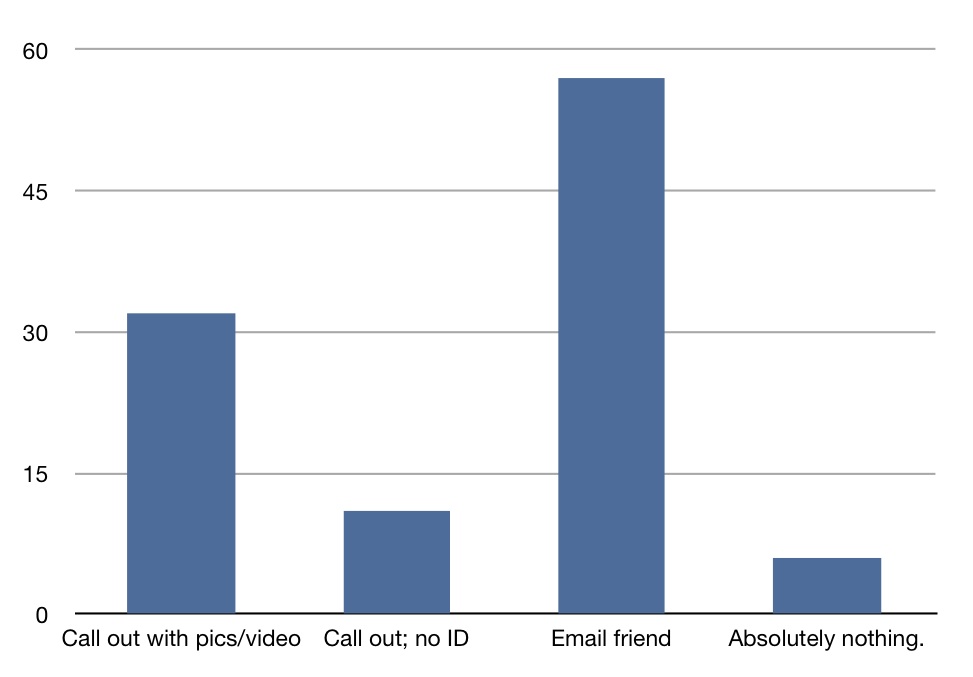
Refollowing is also one of the biggest Twitter annoyances – we polled 95 people to find out what behaviors they considered spam, and refollowing far was the most commonly cited annoyance. That said, refollowing works – it’s the perfect behavior for getting friends. It works for building large profiles. It works for building out targeted friend lists (more on that later). There are three reasons it works:

  1. Somewhere between 18-22% of the poeple you follow will follow you back. Of remaining 82-78% if you follow them again, about 16-20% will follow you back… and so on.
  2. There’s no way to tell if someone has followed you before. Add to that Twitter’s occasional glitches, and people are quick to follow people that may have “fell off” their following list.  The only way Twitter gives you to stop refollowing is to block the other party.
  3. You don’t have a lot of options to build big friend lists if you are not already a celebrity (I suppose having 36,000 followers would make you feel like a celeb, though).

There are many ways to implement refollowing.  You can do so manually, you can use tools like Mr. Tweet.  You can do what I did to test refollowing and use an iOpus iMacro to automate following and a tool like Twitter Karma to automate unfollowing (if you are not doing refollowing, TwitterKarma is a great way to clean out people who you follow, who are not following you).

Here is how refollowing works – in three different versions.

Here’s How Refollowing Works (For Follower List Building)

  1. I follow a whole bunch of people.
  2. Wait
  3. About 20% will follow me back.
  4. Unfollow the ones that don’t follow back.
  5. Start the process over.

Here’s How the Amateur Spammers Do It

  1. I follow a whole bunch of people.
  2. Wait
  3. About 20% will follow me back.  Send an automatic direct message to sell super risky get rich quick scheme.
  4. Unfollow the ones that don’t follow back.
  5. Start the process over.

Here’s How the Professional Spammers Do It

  1. Get a big follower list.
  2. Unfollow your followers.
  3. Follow them again.
  4. About 38% will refollow you.
  5. Send auto direct message for new affiliate offer.
  6. Refollow the remaing 62% and repeat steps 7 and 8 as needed.

Ok, So Can Refollowing be Stopped?
It would be hard to stop refollowing without breaking Twitter.
At the end of March, Twitter did do a few things to slow refollowing down. First, they implemented a cap that only allows you to follow 2000 people until 1800 people follow you. Then you can follow about 200 more people than follow you. The caps result is slowing the maximum rate you can grow an account by refollowing to about 400 people per day.

Now the question is, what legitimate use to you have for 36,000 followers? Hmm.  And that leads us to our next research desk topic: Twitter Spam.

Reblog this post [with Zemanta]

PG
About the Author: Mike Seidle
Mike Seidle is a leading Internet marketing strategist and has been helping companies with search engine optimization and developing cost effective Internet marketing strategies since 1998. Mike is a one of the founders of Professional Blog Service and currently serves on Professional Blog Service's board of directors.

Pro Blog Events

Call Us Now

Email Subscribe

Email address


Topics

Want Pricing or Need a Quote?

Pricing and Quote.


We write blog posts, manage social media campaigns, write online press releases, write monthly news letters and can write your website content.


Find the right pricing package for you!